The Shopify Starter plan is the most popular and affordable option for beginners, priced at just $5 per month. But is it any good? What features does it offer? Are they enough to run a full-scale business?
While the Shopify Starter plan is ideal for beginners, its features enable you to connect directly to your business’s social media handles, thereby expanding your offline e-commerce sales.
But it is still not the ideal solution you may need. When compared against the Shopify Basic Plan, which offers a live store with a website, the Shopify Starter plan lacks several key features. Learn more about what this Shopify Start plan hits and misses in this detailed Shopify starter plan guide.
Shopify Starter Plan – Price, Features, and Details To Know
Here is a snippet of what this Shopify starter plan offers for $5 per month price in 2025:
| Parameters | Details |
|---|---|
| Price | Selling on social media with order management and analytics features |
| Discount | Pay only $1/mo for 3 months |
| Transaction fees | 5% transaction with Shopify Payments |
| Features | Sell products on social media, take payments, and monitor sales with analytics and reports |
| Best For | Selling on social media with order management, and analytics features |
| Customer Support | 24×7 chat support |
| Biggest Drawback | No access to a fully functional online store |
Before you get bogged down in Shopify’s technical terms, here is a Shopify Glossary to simplify things for you.
Do you know?  There are about 2.1 million Shopify merchants globally, and if you are planning to be a part of the Shopify community, the $5/month Shopify Starter plan can be a great way to kick things off!
Shopify Starter Plan – The Pros & Cons
One of the quickest ways to start an online business has some drawbacks. Find the good and the bad about the Shopify Starter plan listed below:
Pros
- Sell for just $5/month.
- Unlimited products and bandwidth.
- Shopify order management and reports feature.
- Sell in-person with Shopify POS Lite.
- Sell directly into messages on any social media.
- Linkpop integration.
Cons
- Does not offer a fully functional Shopify store.
- Limited freedom to customize and brand the website.
- High transaction fees at 5%.
- No access to staff accounts.
- Marketing automation features are unavailable.
Who Is The Shopify Starter Plan Best Suited For?
This lightweight Shopify plan does not fall within the range of the primary Shopify Plans. It is for merchants wanting to start their e-commerce business and set up a Shopify store without a website. It is not for someone willing to build a proper store.

Note: The Shopify Starter Plan is strictly for new Shopify merchants and those currently in their trial period.
Is the Shopify Starter Plan Enough To Start a Store?
To start a store on social media. Yes. This plan is sufficient, but to start a fully functional Shopify store with product listings, themes, and other features, you need to upgrade to the Shopify Base plan or above subscription.
Check out more below!
What Makes The Shopify Starter Plan Special?
Shopify offers a range of useful features, including POS selling access, analytics tools, and more, for just $ 5 per month.
Have a look:
- Unlimited listings – The Shopify Starter plan allows you to add unlimited listings for the store created on social media or messaging apps of your choice.
- Linkpop Links for Selling on Social Media – Using Shopify’s Linkpop feature with the Starter plan, you can get creative and personalize your buyer’s experience.
- Basic Analytics – with access to basic analytics features, you can keep track of your orders, sales, and the profits you are making.
- Shopify Fulfillment network access – Shopify has a special network that can handle storing, packing, and delivering. The Shopify Starter plan also gives you access to this network.
- Shopify POS Selling – Merchants can use the Shopify POS feature for in-person or local market selling by accessing the Shopify POS Lite plan.
Shopify Starter Plan Price
The Shopify Plan in 2025 is still priced at only $5 per month. The plan provides easy access to Shopify, allowing you to start selling products quickly.

However, this is the only tier available for users. If you are looking for a long-term commitment, please note that an annual plan is not available.
The Shopify Started Plan lets you sell your products from the back of your van, garage, or in person. But at only $5 per month, is this the most affordable way to begin your Shopify journey?
Well, it’s not technically the cheapest; There is another way to enjoy more Shopify features while also saving every month! Stay with me until the end to learn more!
Take your first step from the Shopify starter plan, or use our exclusive free trial code shared in the beginning to try out the advanced Shopify plans for $1/month for the first 3 months.
Shopify Starter Plan vs Shopify Basic Plan – Critical Differences To Know
When directly compared to the Shopify Basic plan, the key differences and limitations of the Shopify Starter plan become more evident. Read further to know why upgrading is necessary, and when it is required.
Shopify previously offered a Shopify Lite plan, priced at $9 per month, to help users get started with Shopify.
With a $4 discount for beginners to use Shopify, you can now try out this e-commerce platform for much less.
But how is this new plan compare to the Shopify Basic Plan? Let’s find out:
| Features | Shopify Starter | Shopify Basic |
|---|---|---|
| Price | $5/mo | $39/mo |
| Credit Card Fees | 5% + 30¢ | 2.9% + 30¢ |
| Theme to choose | Spotlight Theme only | Choose over 100+ free and paid themes |
| Best For | Beginners wanting to sell on Social Media. | Beginners want to sell from a structured store and website. |
| Online Store/Website |  |  |
| Free SSL certificate | | |
| Shopify POS Lite | | |
| Customization options | | |
| Annual Discount | | 25% |
| Inventory locations | 2 | 10 |
Demandsage Bonus: Here’s a hack! You can also grab the starter plan for only $1/month for your first three months. If the starter plan is not what you’re looking for, you can sign up for the Shopify trial of any of the standard Shopify plans for $1 per month. Grab either of the above plans by following this guide here.
Shopify Starter Plan Features Explained
In addition to the standard features, here is a brief overview of the key features of the Shopify Starter Plan.
1. Sell Anywhere
With the starter Shopify plan, you can sell anywhere and on social media networks like Instagram, WhatsApp, Facebook, TikTok, Etsy, LinkedIn, etc.
With access to POS Lite, you can sell your products in person. Accepting payments is easy, too, with an option to accept payments using just a smartphone.
2. Linkpop Integration
This 100% free tool is Shopify’s e-commerce link in the bio tool. Linkpop allows you to compile all your links into one place. This helps with 2X conversions, customization, and analytic features.
Here are a few Shopify Starter Plan store examples:
- https://linkpop.com/longhairprettynails
- https://linkpop.com/colinandsamir
- https://itsblume.com/en-us/collections/latte-mix
3. Reports And Analytics
Though the price of the starter plan is cheap, it is definitely not cheap in terms of its reporting features. The Starter plan provides access to analytics pages, finance reports, product analytics, live view, acquisition, inventory, behavior, marketing, order, sales, retail sales, profit, and customer reports.
4. Shopify Order Management
One of the key features of Shopify is its easy inventory management. It offers a smooth dashboard to keep track of inventory. Stock keeping inside Shopify is one of the easiest methods for storing and categorizing your products.
Let’s get you signed up with this exciting plan now!
Demandsage Bonus: Know more about all the features that Shopify offers in its other plans from the Shopify review I covered separately.
How To Sign Up For the Shopify Starter Plan (Full Guide)
Let me show you how to start your Shopify journey. Follow the steps explained below to become a new merchant on Shopify.
Step 1: Click on the exclusive Shopify 3-month trial link. Then, enter your email address and click “Start free trial.”

Step 2: Answer a few questions about you as an entrepreneur and about your website. If you wish, you can skip a question, or all of them, from the button on the bottom right.

Step 3: Select the location where your business is located.

Step 4: Select the method for creating a Shopify account.

Step 5: Upon entering account details, you will have successfully created your Shopify store. Next, select the “pick a plan” button on the right.
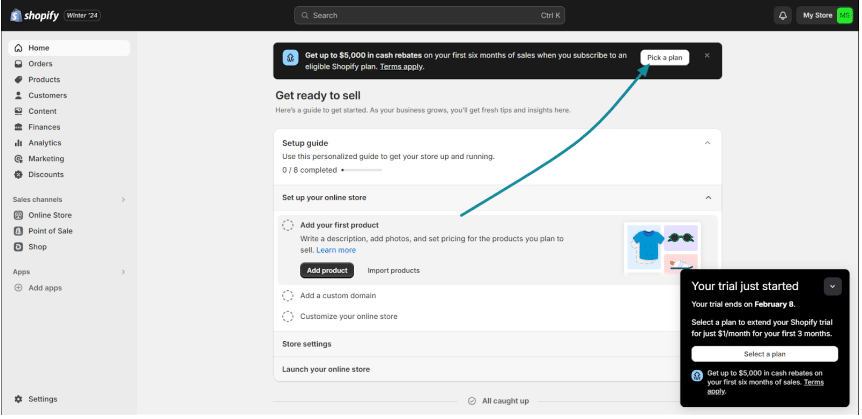
Step 6: After clicking, scroll towards the middle and select the “Starter Plan”.
Step 7: Select a payment method and fill in the payment details. Read the terms and conditions, verify your payment cycle, and click “subscribe” to make a payment.
Once the payment is processed, you will have access to the Shopify Starter Plan.
How To Create Your Shopify Starter Plan Linkpop Landing Page?
In order to use the Starter plan to sell your products through your social media account, you will need to create Linkpop’s shoppable link.
When one of your followers clicks on the link, they are redirected directly to the product catalog. Here, they can simply add products to the cart and complete their payment to purchase your products.
Here’s how you can create your Linkpop landing page and shoppable link:
Step 1. Visit the official Linkpop website and click on the “Sign In” option in the top right corner. It will redirect to the Shopify login page.

Step 2. Since you have already created your Shopify account, choose your email address

Step 3. Next, you will need to create your Linkpop profile by adding:
- Profile Page URL: You can create a URL that will lead to your Linkpop landing page. Set it carefully as it can’t be changed later.
- Profile Photo: Add your profile photo, which is going to appear on your profile.
- Profile Name: Enter your name (You can also use the profile name that you use on your social media profiles)
- Profile Description: Add your profile description or merchandise description.

After adding the necessary details, click “Create Profile”.
Step 4. Next, create your product page by adding a product link, image, affiliate link, and Amazon link (if any). Once it is done, click “Publish”.

Step 5. After adding the product, you can customize the page, layout, and colors. There won’t be many options for your online store, but it will be good enough for people to shop.
Step 6. Finally, copy your link and add it to your social media profiles, and it will appear under your profile.

That’s how you can easily create your Linkpop profile and sell your products through a simple “link in bio” option.
Shopify Starter Plan Review: My Experience
After reviewing the Shopify Starter plan and its features, I noticed how it is more than just affordable for a beginner. This plan allows you to sell without much stress about the investment, and you can focus more on making your brand accessible across your social media network.

Given the Linkpop integration, you can create a page for your brand and monetize your social media reach to sell directly! For someone like me who does not have many technical skills, the customization options within helped a lot.
However, I would have liked the transaction fees to be a bit lower. That is one thing that I would like to get reduced by 5%.
For a test store we opened, I could not break even the amount I invested as early as I thought we could, even after using Shopify Payments.
Conclusion: The Shopify Starter Plan Allows Selling Online at just $5/mo
Subscribe to a Shopify Starter plan to give your products and services an affordable platform to sell!
If your goal is to create a simple social media sales channel for your products without getting bogged down in complex e-commerce operations, you should definitely start with the Shopify Starter plan.
But be aware that the Starter Shopify plan won’t allow you full access to Shopify features or the creation of a website store. Eventually, as your business grows and you need a full-fledged e-commerce website, you will have to upgrade your plan to Shopify Basic or above for advanced features.
Happy selling!
FAQs
It costs $1/month to start a Shopify store using any of the available Shopify plans during the trial period.
No, the Shopify starter plan does not offer a structured website. You can only sell your products with select product pages, contact pages, and a secure Shopify checkout.
There is no expiration date for the Shopify starter plan. It lasts as long as you pay $5 per month.
The cheapest Shopify plan is the Shopify Starter plan, which is priced at $5/month
The post Shopify Starter Plan (2025) – Features, Pros & Limitations appeared first on DemandSage.

![[GET] Justin Leung – Content Academy 3.0 ($997.00)](http://i.imgur.com/YVZpmGa.png)



![Alice In Chains – Sap – EP [iTunes Plus M4A]](http://is1-ssl.mzstatic.com/image/thumb/Music/47/35/c7/mzi.ljwsgbez.jpg/592x592bb.webp)
![Chad Lawson – Awakening: The Stillness Within (2026) [FLAC 24bit/48kHz]](http://imghd.xyz/images/2026/05/09/x5d03jw9bi367_600.jpg)




